NewSyncCast Studio 3.2.1 updates itself

Tools for gamers who stream.

Toolbaaz is where The Hunter AI ships the software he builds for his own BGMI streams. Each tool fixes one real problem, and most of them are free.

Watch how they are made on The Hunter AI YouTube channel.

The kit

One tool so far, with more on the bench. Every tool gets its own page, setup guide and changelog.

  1. 01
    SyncCast StudioFree

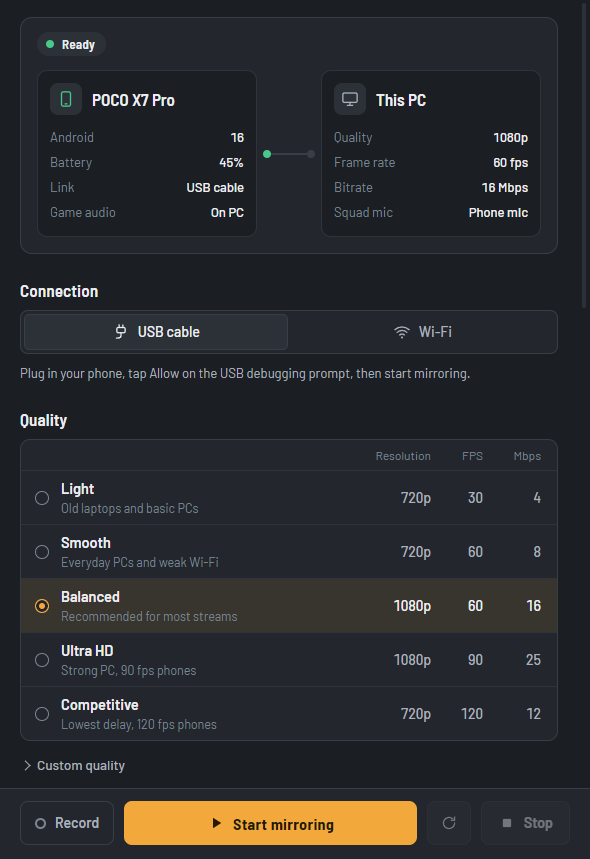
    Mirror your Android phone to your PC for streaming. Game audio stays on the PC with the in-game mic on, and your squad hears your PC mic.

    • Windows 10 / 11
    • Android
    • BGMI
    Details
  2. 02
    In the workshopComing soon

    The next tool is being built. Subscribe on YouTube to hear about it first.

Have a problem that deserves a tool? Tell us on Telegram.

Why SyncCast exists

Turn on the mic, lose the gun sounds.

When you turn on the in-game mic to talk to your squad, the phone switches to call mode. Many mirroring setups then send the game audio back to the phone speaker, and your stream goes quiet.

Game audio stays on the PC. Your squad hears your PC mic.

SyncCast Studio captures the game sound and your squad’s voices by type, so the call mode does not move them. Your PC microphone replaces the phone mic in the voice chat, so you can talk with your headset on.

  • Android 13+for voice chat features
  • Windows 10 / 1164-bit PCs
  • No phone appjust USB debugging, once

Setup guide, requirements and FAQ

UPI QR code for hunterai@ybl

Keep the tools free

Every tool here is built and tested on real phones. If one saves your stream, scan the code with any UPI app and chip in what feels right.

hunterai@ybl