SyncCast Studio
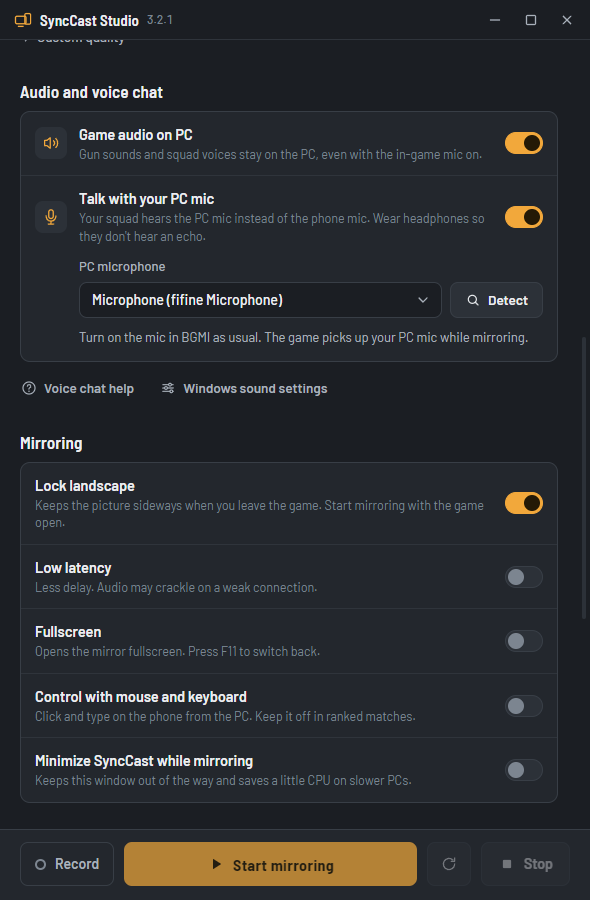
Mirror your Android phone to your Windows PC for streaming. Game audio stays on the PC even with the in-game mic on, and your squad hears your PC mic.
| Version | 3.2.1, October 2026 |
|---|---|
| PC | Windows 10 or 11, 64-bit |
| Phone | Android 5.0 or newer to mirror, Android 11 for game audio, Android 13 for the voice chat features |
| On the phone | Nothing to install. Turn on USB debugging once. |
| Connection | USB cable, or Wi-Fi after the first USB connection |
| Price | Free |
What it does
Game audio stays on the PC
Gun sounds and your squad’s voices keep playing on the PC when you turn on the in-game mic. Android 13 or newer.
Talk with your PC mic
Your squad hears your PC microphone instead of the phone mic, so you can play with your headset on. Android 13 or newer.
Up to 120 fps
Five quality presets, from Light for old laptops to Competitive at 120 fps, or set your own.
Light on the PC
The video is decoded on the graphics card, so OBS and the game get the CPU.
Record your sessions
Save the mirror as an MKV file in Documents, ready for editing.
Phone camera as a webcam
Use the front or back camera as a facecam in OBS. Android 12 or newer.
Set up in three steps
Turn on USB debugging
On the phone, open Settings, About phone, and tap Build number seven times. Then open Developer options and turn on USB debugging.
Install and plug in
Install SyncCast Studio, connect the phone with a USB cable that carries data, and tap Allow on the phone.
Start mirroring
Pick a quality preset, turn on Game audio on PC and Talk with your PC mic, open BGMI and click Start mirroring.
Questions
Windows says it protected my PC. Is it safe?
SyncCast Studio is not code-signed yet, so Windows SmartScreen warns about any new download. Click More info, then Run anyway. The source of the app and of its engine is public on GitHub.
Does it work with an iPhone?
Not yet. SyncCast uses Android’s USB debugging, which iPhones do not have. iPhone mirroring over AirPlay is planned.
Is it safe to use in ranked matches?
SyncCast mirrors the screen and audio, like a capture card; it does not change the game. Keep “Control with mouse and keyboard” off in ranked matches.
Which phones has it been tested on?
realme GT 6T (ColorOS 16) and POCO X7 Pro (HyperOS), both on Android 16, playing BGMI with voice chat. Other phones on Android 13 or newer should work; tell us on Telegram if yours does not.
Why do the voice chat features need Android 13?
They use audio capture features that Android added in version 13. On Android 11 and 12, mirroring and game audio work, but the game audio stops on the PC when the in-game mic is on.
How do I get new versions?
From version 3.2.1, SyncCast checks for updates by itself and shows a banner with an Update now button; it installs the new version and opens again, keeping your settings. On 3.2.0, download 3.2.1 from this page once.
Is it really free?
Yes. No account, no watermark and no ads. If it helps your streams, you can support it with UPI at the bottom of this page.
What’s new
3.2.1 Latest
- SyncCast updates itself: a banner tells you about a new version and Update now installs it, keeping your settings.
- Every install and update starts from a clean app folder.
3.2.0
- Game audio stays on the PC when the in-game mic is on (Android 13+).
- Talk with your PC mic: your microphone replaces the phone mic in the voice chat.
- New engine based on scrcpy 5.0.1, with hardware video decoding.
- Redesigned interface, a Light preset for older laptops, and no more Python backend.
- Fixed: low latency mode, landscape lock, and turning game audio off.
The engine is open source: SyncCast Engine on GitHub. Questions or a phone that does not work? Ask on Telegram.

Keep the tools free
Every tool here is built and tested on real phones. If one saves your stream, scan the code with any UPI app and chip in what feels right.